Delete your account
You can delete a Bobbin's Pond account from inside the app. Deletion is permanent. It removes the account and the cloud save tied to it. The device then starts a new guest game.
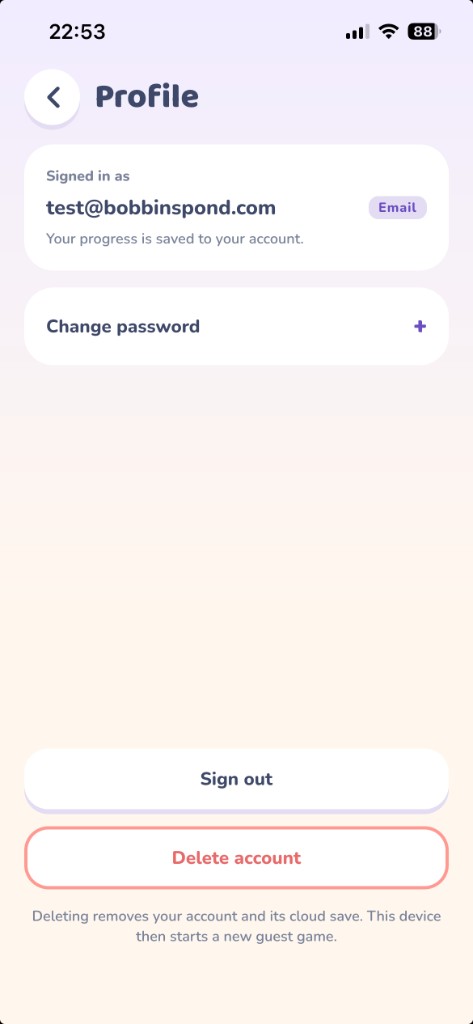
Steps
- Open Bobbin's Pond and sign in with the account you want to delete. Email, Google, and Apple accounts all use this same screen.
- From the menu, open Settings, then Profile.
- Tap Delete account. The button fills in and its label changes to “Tap again to delete your account”.
- Tap that button again while it still says so. A second tap that lands immediately is ignored, so wait a brief moment, then tap again. If you wait too long, the button returns to “Delete account” and you start over.
What is removed
The account and its cloud save are deleted. Gold, the collection, and other progress stored on that account are not kept. This cannot be undone. Signing out does not delete the account.
Deleting the Bobbin's Pond account does not delete your Google or Apple account.
A guest game has no account. Uninstalling the app does not delete an account that still exists in the cloud. Sign in and follow the steps above.
To ask about other information you sent through the app, such as feedback, email support@baikoft.com.